
Home / Industries / Barbers & hair salons
Barbers & hair salons

Barbershop marketing that keeps every chair busy

Most shops don't have a talent problem. They have a Tuesday problem: Saturdays are packed, mid-week chairs sit empty, and half the DMs are people asking "how much for a fade?". Fix how people find you, see your prices and book, and the quiet days start filling.

Prices on the first screenConnects to the booking app you useFree website preview
Where bookings leak

Four questions every new client asks before they sit down

If your website, Google profile or Instagram can't answer these in a few seconds, the client books with the shop that can.

๐Ÿ’ฒ

"How much?"

A short price list with your most-booked services: cut, fade, cut and beard, kids, color. You don't need every variation, just enough that nobody has to DM to find out.

โฑ๏ธ

"Can I get in today?"

Say clearly whether you take walk-ins, appointments, or both, and put the booking button where the thumb lands. A shop that's "appointment only" but doesn't say so loses walk-ins at the door.

โœ‚๏ธ

"Are they any good?"

Real photos of real cuts, ideally one set per barber or stylist, plus your Google rating. This is where Instagram earns its keep, if your best work is easy to find from your site.

The fourth question is "where do I park?". Put it next to your address. It sounds small; it's one of the most common things people ask shops.

Your website

Built around the booking button

You probably already use a booking app. The website's job is to send people into it with as few taps as possible, and to convince people who haven't booked with you before.

1
One "Book" button, everywhereIn the header, under the prices and at the bottom. It opens the booking tool you already use, and I connect it with the $49 booking setup.
2
A page or section per barberClients follow people, not just shops. Name, specialties, a few photos and a link straight to their own calendar.
3
Walk-in policy and hours, plainlyIncluding the hour you stop taking walk-ins, so nobody shows up at 7:45 to a locked door.
4
Your Instagram, pulled in, not replacing the siteLink your best posts, but keep prices and booking on pages you control.

Chair or booth renters?

Shops with renters have a different problem: every barber books on their own calendar. I build the site so each renter has their own card and booking link, while the shop keeps one shared Google profile, address and brand. Everyone benefits from the shop's reviews, and nobody loses their own clients.

What it costs

Website $397 one-time, including Google Business Profile setup and a review kit. Booking app connection $49. Extra pages $49 each, for example one per barber if you want full profiles.

The slow-day plan

Filling Tuesday without discounting Saturday

Discounts work best when they're aimed only at the hours you can't fill anyway. Here's the order I'd try things in.

  1. Rebooking at the chairThe cheapest new booking is the next one from the client already in the chair. "Same time in three weeks?" before they pay, booked straight into the app.
  2. A reminder when they're dueA short text around the time their usual cut grows out, sent only to clients who agreed to receive texts. A $99 SMS campaign to an opted-in list can fill a slow week from people who already like you.
  3. A weekday-only offer for new clientsSomething like a first-cut price on Tuesday to Thursday mornings, shown on your site and Google profile. Weekends stay full price.
  4. Short videos of the workBefore-and-after fades, beard line-ups, a kid's first haircut (with parent permission). Send me phone clips and I edit them into reels at $39 each.
  5. Local ads aimed at a tight radiusOnly once the above is in place. Facebook and Instagram ads to people within a couple of miles, pointing at the weekday offer. Management is $250/month plus your ad budget.
Example

A barbershop site built this way

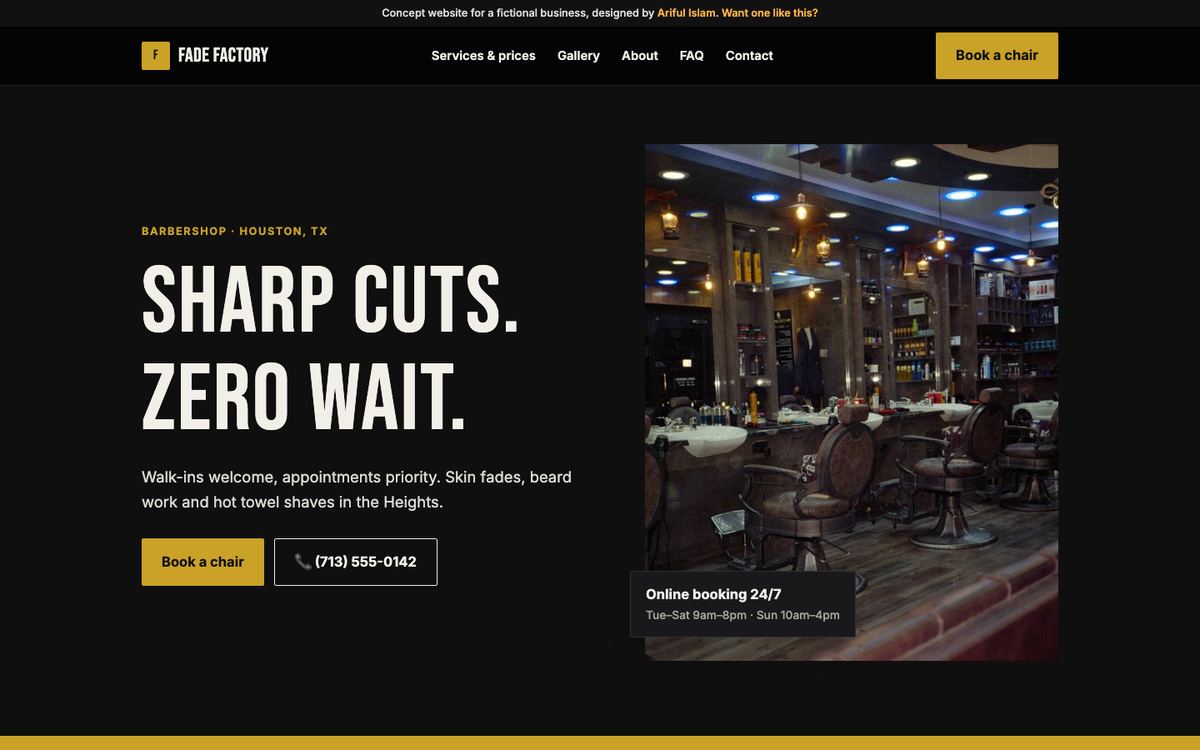
Fade Factory Barber Co. is a concept site I built for a fictional Houston shop: four chairs, walk-ins welcome with appointments first. The price list is on the first screen and "Book a chair" follows you down the page. Open it on your phone.

Fade Factory Barber Co. website design
Concept build ยท Barbershop ยท Houston, TX

Fade Factory Barber Co.

A busy walk-in shop with only an Instagram page. Customers DM'd for prices and hours all day.

  • Price list on the first screen
  • Book-a-chair button on every section
  • Hours, parking and walk-in policy answered up front
View live site โ†’
Reviews

Getting reviews the right way

Do

  • Put your Google review QR code at the mirror or the register
  • Ask when a client is checking their cut and smiling
  • Reply to every review by name, especially the critical ones
  • Ask clients to mention their barber's name, which helps renters too

Don't

  • Offer a free cut or discount in exchange for a review
  • Ask family or friends who've never been in
  • Copy reviews from Instagram comments onto Google
  • Argue with a bad review in public

Google's policies don't allow incentivized reviews: see Google's prohibited and restricted content policy. Asking happy clients is fine.

FAQ

Barbershop marketing questions

Does a barbershop need a website if it has Instagram and a booking app?

Yes, but a simple one. Google shows your website on your profile and in search, and many people want prices, hours, parking and a booking button without scrolling through posts. The site connects your Instagram, booking app and Google profile into one place you control.

Should I show prices on my website?

Yes. Even a short list of your most popular services cuts down on DMs and stops people leaving to check a competitor. You can add "from" prices for services that vary.

How do I get more clients on slow weekdays?

Start with rebooking at the chair and reminders to opted-in clients, then add a weekday-only offer for new clients on your site and Google profile. Paid local ads come last, pointed only at those quiet hours.

Can each barber have their own booking link?

Yes. I can give each barber or renter their own section with their photos and a direct link to their calendar, while the shop keeps one Google profile and brand.

Which booking app do you work with?

The one you already use. The $49 booking setup connects it to your website buttons and your Google profile so clients can book in a couple of taps.

See it before you pay

Get a free preview of your new website first. Then decide.